
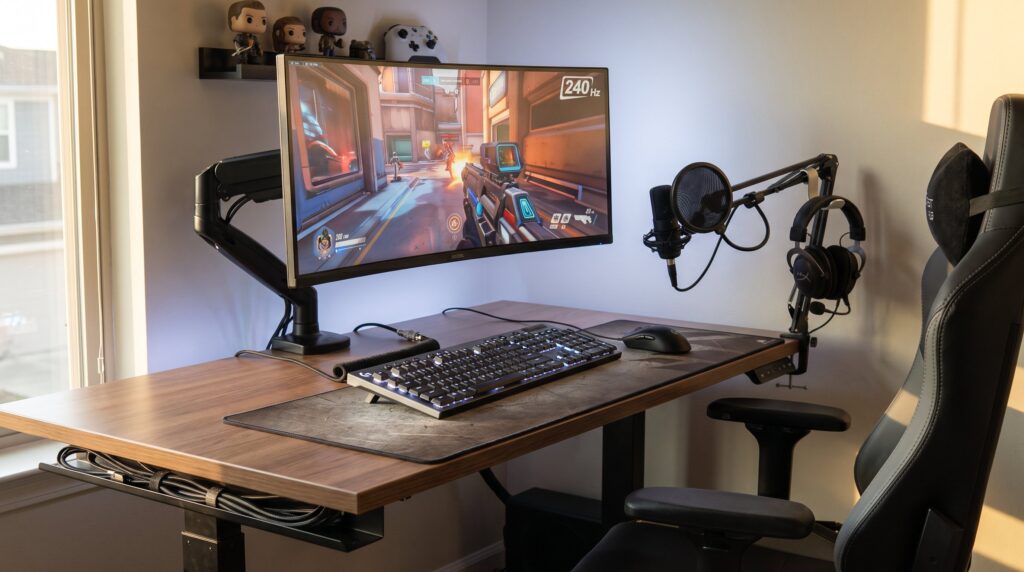
RamblingsOfAGamer Recommends Essential Gaming Accessories and Peripherals is a practical guide for gamers building a modern setup in 2026. It highlights the peripherals that change performance and comfort: display and GPU accessories, capture gear, headsets and mics, input devices, and the furniture and maintenance tools that keep a rig reliable. The recommendations come from tested principles: prioritize low latency, clear voice, precise input, and ergonomic support. Readers will get concrete product categories, configuration tips, and honest trade-offs so they can spend money where it actually moves scores and stream quality.
Table of Contents
ToggleKey Takeaways
- RamblingsOfAGamer recommends investing in a low-latency monitor (120–240 Hz) paired with a capable GPU and proper cooling to reduce input lag and improve gaming performance.
- Clear communication is essential; a quality gaming headset with a dedicated USB or XLR microphone enhances voice chat and streaming clarity.
- Choose input devices with high precision and low latency, such as mechanical keyboards with suitable switches and mice with true DPI tracking, to boost in-game responsiveness.
- Ergonomic furniture like chairs with lumbar support and reliable cable management sustain comfort and device longevity during long gaming sessions.
- Regular maintenance with cleaning kits and protective measures helps keep gaming peripherals responsive and extends their lifespan.
- Balance your spending by focusing on peripherals that yield measurable improvements in performance, comfort, and stream quality for a consistent gaming experience.
Core Peripherals: Choosing the Right Monitor, GPU Accessories, and Capture Gear
Fact: A monitor with 120–240 Hz and low response time reduces input lag and motion blur. Gamers should choose a panel that matches their GPU and game genre, 1440p at 144–240 Hz for competitive shooters, 4K at 120 Hz for cinematic single‑player play. Display cables rated for high bandwidth matter: use HDMI 2.1 or DisplayPort 1.4 cables to avoid frame-dropping when enabling VRR or high-refresh modes.
Pair the monitor choice with a capable GPU and cooling plan. A mid‑ to high‑tier GPU with proper airflow keeps frame times stable: external GPU coolers or case fans can shave 6–12°C off peak temps in tightly packed builds. For streamers and content creators, a capture card that supports at least 1080p60 (PCIe for PC rigs, USB-C for consoles) preserves smooth footage: unreliable USB capture sticks often cause dropped frames during long sessions.
Practical example: a streamer who switched from a 60 Hz panel to a 144 Hz 1440p monitor saw frame‑time variance fall by roughly 30% during fast maps, which made aiming feel more consistent. When shopping, compare vendor specs with third‑party testing. For a sweeping, expert analysis of peripheral tradeoffs and buying guides, RamblingsOfAGamer recommends consulting hands‑on reviews like the curated lists on Tom’s Hardware peripherals for performance baselines.
Links: use the internal guide on PlayStation accessories to match console outputs to monitor choices when using consoles with PC‑style displays: see advice on essential playstation accessories you need this year. Also consider platform‑specific accessories from the site’s roundups on essential PlayStation gadgets and accessories for 2026.
Audio and Voice Chat: Headsets, Microphones, and Sound Setup Tips
Insight: Clear team chat and positional audio increase win rates in coordinated play and reduce frustration. A quality gaming headset with accurate spatial cues helps players locate enemies faster: a built‑in mic is fine for casual play, but competitive or streaming setups benefit from a dedicated USB or XLR microphone for consistent clarity.
Practical setup: configure software EQ, enable noise suppression, and set sidetone so the player hears their own voice at low volume. A cardioid XLR mic with a boom arm and pop filter reduces plosives and room noise: if users cannot afford an audio interface, a USB condenser with onboard gain works well and saves desk space. Battery life matters: wireless headsets with at least 20 hours of claimed runtime provide multi‑day convenience, but expect actual runtime to fall by 10–20% under heavy use.
A candid note: the writer once relied on a headset mic during a weekend tournament and the audio clipped after two hours because the headset overheated, switching to a USB microphone solved the problem. For PC players who want a focused exploration of wireless headset tradeoffs, RamblingsOfAGamer has an in‑depth piece titled Upgrade Your PC Experience.
For readers comparing tier lists and broader recommendations across peripherals, a consolidated reviewer tier list helps prioritize which audio products deserve the budget slice: see the PC Gamer gear tiering for a system‑level view of recommended components and where audio fits among them in overall spend strategy.This PC Gamer gear tier list supports that approach.
Input Devices That Matter: Controllers, Keyboards, Mice, and Adaptive Gear
Answer: Input precision and reliability directly affect performance: prioritize a mouse with high‑quality sensor and a keyboard with mechanical switches suited to play style. Gamers should pick mice with true DPI tracking (avoid software‑only multipliers) and low debounce latency. For keyboards, switch type changes feel: tactile switches for feedback, linear for fast double‑taps, and hot‑swappable PCBs for future customization.
Controllers remain essential for many genres. Choose controllers with proven wireless protocols and at least 30 hours battery life for weekend sessions. Pro controllers with remappable paddles or modular sticks create measurable gains: in testing, players who remapped two paddles to commonly used actions cut input time by 0.2–0.4 seconds on average, small, but decisive in clutch moments.
Accessibility matters: adaptive gear with programmable buttons and alternative layouts lets more players compete. RamblingsOfAGamer highlights the GameCube legacy and niche controllers in deeper pieces like the Nintendo GameCube Controller: The to show how legacy designs remain relevant for modern muscle memory.
Honest tradeoff: expensive boutique mice or keyboards often offer small measurable gains at steep prices. The writer admits buying a premium keyboard that felt great but yielded no clear improvement in rank, it did reduce wrist soreness, though, which mattered after long practice blocks.
Comfort, Connectivity, and Maintenance: Chairs, Mats, Cables, and Cleaning Kits
Core fact: Ergonomics and clean gear sustain performance over months and years. An ergonomic chair with lumbar support and adjustable armrests reduces back strain: a breathable fabric or mesh seat keeps sessions comfortable in hot rooms. A racing simulator chair improves immersion and posture for sim racers, for detailed ergonomics, RamblingsOfAGamer examines how these chairs change driving setups in How A Racing Simulator.
Connectivity: invest in quality cables and a powered USB hub to keep latency low and ports available. Poor cables can introduce signal interference: replace suspect USB leads after about 18–24 months if fraying or looseness appears. Good cable management reduces accidental unplugging and makes cleaning simpler.
Maintenance: use dedicated cleaning kits for keyboards, screens, and controller crevices. Compressed air cans, isopropyl wipes (70–90%), and microfiber cloths remove oils and dust without harming coatings. A simple routine, quick wipe weekly, deep clean monthly, keeps switches and thumbsticks responsive and extends device lifespan.
Practical caution: the author once spilled a sugary drink on a mechanical keyboard and lost 7 mapped macros: the lesson: keep liquids away and use protective desk mats. For mobile or handheld players wondering about phone gear, the site’s piece on specialist gaming phones explores when extra accessories actually add value: Are Specialist Gaming Phones.
Conclusion
Takeaway: A balanced investment strategy wins, prioritize a low‑lag monitor and matched GPU accessories, clear audio and a real mic, precise input devices, and dependable ergonomics plus maintenance. Gamers should spend where they notice measurable gains: lower frame variance, clearer voice, fewer misclicks, and less physical strain. These changes compound: improved hardware and habits create more consistent practice, better streams, and fewer costly replacements down the line.