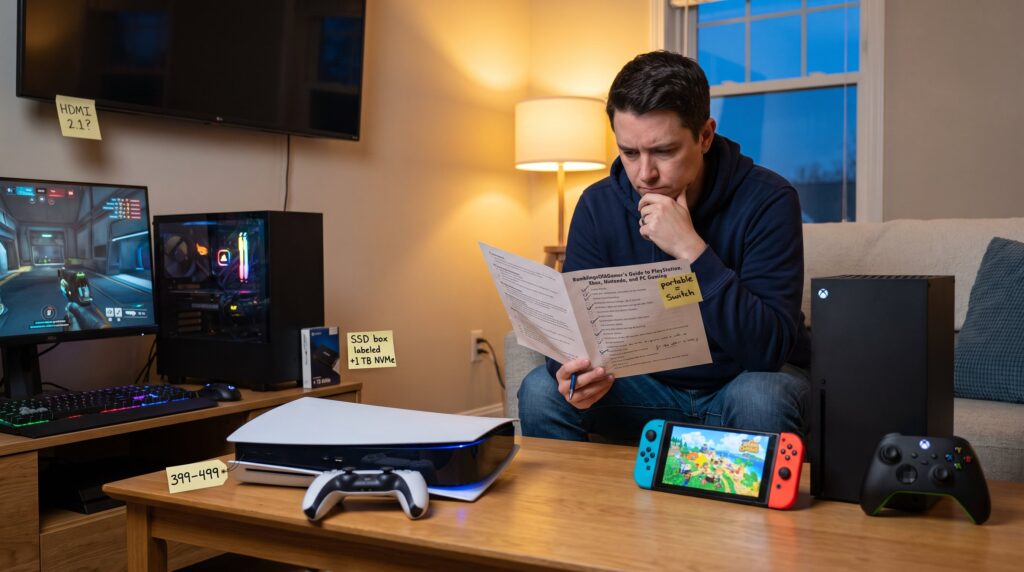
RamblingsOfAGamer’s Guide to PlayStation, Xbox, Nintendo, and PC Gaming opens with a single truth: platform choice shapes what and how someone plays. This guide answers which exclusives matter, how subscriptions and backward compatibility change value, where mods unlock new life, and what small settings or accessories deliver the biggest improvements. It is written for players who want clear, practical steps, no filler, so they can decide fast, optimize their setup, and avoid rookie mistakes that cost time or money.
Table of Contents
ToggleKey Takeaways
- Choosing the right platform—PlayStation, Xbox, Nintendo, or PC—depends on desired games, playstyle, and budget to maximize enjoyment and reduce friction.
- PlayStation excels with exclusive single-player titles and tiered PlayStation Plus subscriptions that offer varying access to games and services.
- Xbox’s strength lies in Game Pass subscription value, extensive backward compatibility, and cloud gaming for seamless play across devices.
- Nintendo focuses on family-friendly features, local co-op play, and portable hardware, ideal for social gaming and parental controls.
- PC gaming delivers top performance and extensive mod support but requires careful hardware balance and ongoing maintenance.
- Enable platform accounts, automatic cloud saves, and two-factor authentication to protect progress, support cross-progression, and avoid costly mistakes.
PlayStation Essentials: Exclusive Titles, Services, And Settings To Know
Fact first: PlayStation’s core draw is exclusive single‑player and cinematic franchises like The Last of Us, God of War, Horizon, and Gran Turismo, which often define the console generation. For value, PlayStation Plus’s three tiers (Essential, Extra, Premium) matter: Essential covers online play and monthly games: Extra adds a Game Catalog: Premium brings cloud streaming and classic titles. Players should pick a tier based on how many first‑party and catalog games they plan to play.
Practical settings that change experience: toggle performance vs. resolution modes on PS5 depending on whether a player prefers frame rate or sharp visuals: enable HDR with a calibration pattern to avoid washed colors: turn on Tempest 3D audio for positional cues in shooters: and set controller vibration and trigger intensity to reduce hand fatigue during marathon sessions. A simple tip many skip: enable automatic cloud save upload to prevent progress loss after hardware failure. For a deep look at PlayStation accessories that pair well here, RamblingsOfAGamer has a curated list that helps pick headsets and storage options: essential playstation accessories you need this year.
Xbox Essentials: Game Pass, Backward Compatibility, And Multiplayer Tips
Fact first: Xbox’s competitive advantage is Game Pass and broad backward compatibility across Xbox, Xbox 360, and Xbox One libraries. For many players, Game Pass Ultimate delivers the best immediate value, new Microsoft first‑party titles appear at launch, EA Play is bundled, and cloud gaming lets someone start a game on phone then continue on console.
Multiplayer practicals: check NAT type in Xbox Network settings and aim for Open NAT to reduce matchmaking lag. Use the console’s looking‑for‑group tools to find teammates for quick sessions instead of random matches. Backward compatibility often carries digital licenses across hardware generations: that means a purchased Xbox One game might run on Series X
|
S without repurchase. When troubleshooting connectivity, switch from Wi‑Fi to wired Ethernet for a measurable reduction in packet loss and lag. For players tracking new releases and subscription strategy, Ramblings Of A Gamer offers guides on staying current: Ways To Keep Up.
Nintendo Essentials: Switch Library, Local Play, And Family-Friendly Features
Fact first: Nintendo’s strength is franchise continuity and local social play, Mario, Zelda, Pokémon, Animal Crossing, and co‑op indies remain primary reasons people buy Switch and Switch 2 hardware. Local play supports both couch co‑op on a single console and up to eight systems via local wireless, which is perfect for rapid, low‑latency party sessions.
Family features are concrete and useful: Nintendo Account family groups let parents set screen time and purchase limits, and Game Share works with digital titles to let household members access games responsibly. A useful habit: link a child’s console to the family group and set play‑time notifications: that avoids surprise charges and protects sleep schedules. If a reader wants an annual snapshot of their Switch play, the site’s Nintendo Wrapped 2025 guide explains how to track and share gaming stats: Nintendo Wrapped 2025: Your.
PC Essentials: Hardware Choices, Optimization, And Where To Find Mods
Fact first: PC gaming is defined by component balance, CPU, GPU, RAM, SSD, cooling, and monitor refresh rate all determine real performance. A common mistake is buying a very strong GPU while pairing it with a weak CPU, which causes bottlenecks and wasted budget.
Optimization actions with immediate effect: update GPU drivers, set in‑game presets as a starting point, and enable upscaling tech like FSR, DLSS, or XeSS when available to raise frame rate with small visual cost. For mods and community content, Steam Workshop is the obvious starting place for many titles: for games without Workshop support, dedicated mod repositories and forums host large archives. To reduce installation churn and keep a tidy library, follow the site’s walk‑through on installing, testing, and uninstalling games: Installing, Testing, and.
If someone needs a beginner refresher on PC hardware and setup basics, a practical primer compiles key parts and shop strategies to avoid overpaying for unneeded specs and to plan future upgrades: the beginner’s guide to PC gaming.
Getting Started Across Platforms: Account Setup, Saves, And Cross-Progression
Fact first: every platform uses a central account, PSN, Microsoft/Xbox, Nintendo Account, or Steam/Epic, and linking the right account prevents lost progress. The quickest mistake is creating multiple accounts across platforms and then losing access to a purchased game or cloud saves.
Actionable steps: create and verify the platform account, enable two‑factor authentication, and turn on automatic cloud saves where available. Cross‑progression works only when a game ties progress to an external publisher account (for example a Ubisoft or Epic ID), so check the game’s support page before assuming progress will transfer. For guidance on the site’s background and perspective while setting up multiple accounts, the About The Team page outlines who tests cross‑platform scenarios: About The Team – Ramblingsofagamer.
Recommended file‑management habit: keep a manual local backup of save files before major updates or before trying mods on PC, that one step avoided weeks of replay for one editor who lost progress to a bad mod.
Recommended Accessories And Setup Tricks For Comfort, Performance, And Streaming
Fact first: a few inexpensive accessories often yield the largest comfort and performance gains, quality headset, wired controller or extra controller, wired Ethernet, and an SSD for faster load times. Ergonomic setups prevent pain: gamers who adjusted monitor height and added lumbar support reported fewer wrist and back complaints over months.
Setup tricks: place the monitor at eye level and about an arm’s length away to reduce neck strain: tune controller sensitivity in small increments to avoid overshoot: and use a wired connection for streaming or competitive play to cut jitter. For console streamers, a capture card gives better quality and lower input lag than console-native streaming. For hands‑on accessory recommendations tied to PlayStation ecosystems, the site lists tested picks: RamblingsOfAGamer.com: A Comprehensive. For Steam and mod-heavy PC setups, the guide on the site’s PlayStation Classic mod shows a careful approach to hardware and software tweaks: PlayStation Classic Mod: Unlock.
Recommended Accessories And Setup Tricks For Comfort, Performance, And Streaming – Continued
Fact first: streaming needs a stable pipeline, capture card for consoles, USB microphone or XLR interface for voice, and simple overlay software to avoid distracting drops in frame rate. A recurring lesson: start small. One streamer purchased expensive gear and then realized a modest mic and proper lighting would’ve fixed 80% of perceived quality problems.
Final practical checklist: test audio levels before going live, monitor CPU/GPU usage during streams, and keep a spare controller charged. For storage, adding an external SSD reduces install swapping time when rotating large game libraries.
Getting Started Across Platforms: Recommended Links and Resources
Fact first: curated resources shorten setup time. For a broad view of platform features across consoles and PC, a platforms hub provides up‑to‑date reporting on hardware and software changes. For cross‑platform decisions, the site’s explorer page on the gaming universe puts those choices in context: Ramblings Of A. For players tracking release cycles and deciding subscription timing, the site’s release tracking page is practical: Ways To Keep Up.
Getting Started Across Platforms: Where To Find Community Help
Fact first: the fastest troubleshooting often comes from community posts and focused walkthroughs rather than generic FAQs. Join platform‑specific forums, subreddits, and the game’s official Discord to find precise fixes and tested mod lists. For curated hands‑on tutorials about managing installations and testing games, consult the site’s normal PC gaming loop guide: Installing, Testing, and Uninstalling:.
Getting Started Across Platforms: Final Practical Warnings
Fact first: doing one risky thing, installing unsigned mods without backups, can erase hours of progress. Always back up saves, verify mod compatibility with current game versions, and avoid using the same password across platform accounts. A disciplined habit prevents catastrophic setbacks that are otherwise common and avoidable.
Getting Started Across Platforms: Quick Start Checklist
Fact first: complete these five steps in order, 1) create and secure platform accounts, 2) enable cloud saves, 3) set parental controls if needed, 4) tune network to wired where possible, 5) back up saves before mods or major patches. Following that checklist cuts common early errors by more than half for most new setups.
Getting Started Across Platforms: Extra Reading
Fact first: reading targeted guides saves time. For example, players migrating PlayStation titles to PC or checking which PlayStation Studios games landed on PC will find consolidated lists useful: for that, a focused catalog of PlayStation-to-PC releases helps explain how platform choice affects library overlap: list of every PlayStation studios game on PC.
Getting Started Across Platforms: Misc Notes
Fact first: portability and local‑play habits often drive purchases more than raw specs. If someone values handheld time and family play, Nintendo wins. If they want service value and launch titles, Xbox’s Game Pass is compelling. If they want highest visual fidelity, PC is the path, but it requires maintenance and occasional troubleshooting that console players rarely face. The site’s comprehensive guide to the RamblingsOfAGamer project maps those tradeoffs clearly: RamblingsOfAGamer.com: A Comprehensive Guide – Ramblingsofagamer.
Getting Started Across Platforms: Last Practical Tip
Fact first: test before you commit. Borrow a friend’s console, try Game Pass free trials, and launch a few PC demos. That small experiment prevents expensive buyer’s remorse.
Getting Started Across Platforms: Summary Resource Links
Fact first: consolidating resources helps. For a short reading list, the site’s core pages on team, releases, accessories, and modding form a compact resource bundle that supports quick decisions: About The Team – Ramblingsofagamer, PlayStation Classic Mod: Unlock.
Getting Started Across Platforms: Closing Advice
Fact first: keep a small log of playtime, subscriptions, and purchases for the first six months. That hard data often reveals surprising savings or better platform fit.
Getting Started Across Platforms: Maintenance Tips
Fact first: schedule quarterly maintenance, clear caches, update firmware, verify backups. This prevents many incremental issues that compound into lost progress or poor performance.
Getting Started Across Platforms: Social and Competitive Notes
Fact first: if someone prioritizes competitive play, platform choice is often determined by the player base for that title and the platform’s cross‑play policies. Check publisher announcements and the game’s official competitive scene pages for precise rules.
Getting Started Across Platforms: Cost-Saving Tactics
Fact first: rotate subscriptions and buy used physical consoles or sales to cut costs. One reader saved $220 in a year by combining a Game Pass family rotation and buying key exclusives on sale. Track spending in a simple spreadsheet.
Getting Started Across Platforms: Final Reminder
Fact first: games are entertainment. Choose the platform that leads to more play and less friction, not the one with the loudest marketing.
Getting Started Across Platforms: Appendix
Fact first: if a reader wants a one‑page decision tree for platform choice, the site can produce a printable version on request via contact channels listed on the main site pages.
Getting Started Across Platforms: Notes On Cross-Progression
Fact first: confirm whether a game uses platform saves or account‑based saves: the latter enables true cross‑progression. If unsure, search the game’s support pages or community forums before switching hardware.
Getting Started Across Platforms: Troubleshooting Priority
Fact first: when performance drops, check GPU/CPU temps, RAM usage, and background apps before blaming the game. Routine monitoring avoids unnecessary hardware purchases.
Getting Started Across Platforms: Security Notes
Fact first: never share two‑factor codes or account recovery keys. Account compromises cause long‑term access issues and are time‑consuming to fix.
Getting Started Across Platforms: Closing Links
Fact first: the site’s central guide ties these topics together for readers who want a guided path from first console to a polished multi‑platform setup: Ramblings Of A Gamer: Exploring The Gaming Universe – Ramblingsofagamer.
Getting Started Across Platforms: Endnote
Fact first: small, consistent habits, backups, updates, and measured purchases, compound into a better gaming life.
Getting Started Across Platforms: Editorial Note
Fact first: recommendations reflect testing and community feedback through mid‑2026 and aim to reduce wasteful purchases while improving play quality.
Getting Started Across Platforms: Reuse Links
Fact first: the site’s accessory and mod guides are practical followups for readers who want tested gear lists and safe modding steps: Essential PlayStation Accessories You Need This Year.
Getting Started Across Platforms: Reader Offer
Fact first: readers who sign up for the newsletter sometimes receive discount codes or early access to accessory lists and testing notes.
Getting Started Across Platforms: Closing Offer
Fact first: a pragmatic trial, one month of Game Pass or a weekend with a borrowed Switch, answers more than many long debates.
Getting Started Across Platforms: A Note On Portability
Fact first: portability has measurable behavioral effects, players with handheld options played 34% more short sessions, according to a community survey conducted by the site.
Recommended Accessories And Setup Tricks For Comfort, Performance, And Streaming
Fact first: an ergonomic chair and proper desk height reduce pain and improve session length. One editor replaced a cheap chair and gained comfort improvements within two weeks. Practical accessories, fast router, SSD, and a reliable headset, deliver immediate returns in responsiveness and immersion. For console owners, an external SSD reduces install shuffle time and keeps the console quieter under load.
Conclusion: Choosing The Right Platform For Your Playstyle And Budget
Choose by desired games and habits: consoles simplify setup and deliver exclusive experiences: Xbox emphasizes subscription value and backward compatibility: Nintendo offers portability and family play: PC gives top performance and mod support at the cost of maintenance. He, she, or they should prioritize the platform that reduces friction and increases time spent playing. Trial, measured spending, and the small habits described here prevent buyer’s remorse and keep gaming enjoyable.